Verified Excel workbook
Free 2026 Construction WIP Workbook in Excel
This Free 2026 Construction WIP Workbook in Excel organizes a current-period work-in-progress review across active construction jobs. Download the workbook to enter project contract, cost, and billing figures in USD and see linked project-level, company-level, and dashboard results. It is built for an internal monthly project-controls workflow.
Enter one current-period project record per job, confirm job status, and review calculated cost-to-cost earned amounts, under/(over) billing, projected gross profit, operational alerts, and data checks. The workbook is an internal project-controls aid; it does not replace the underlying project records used by your team.
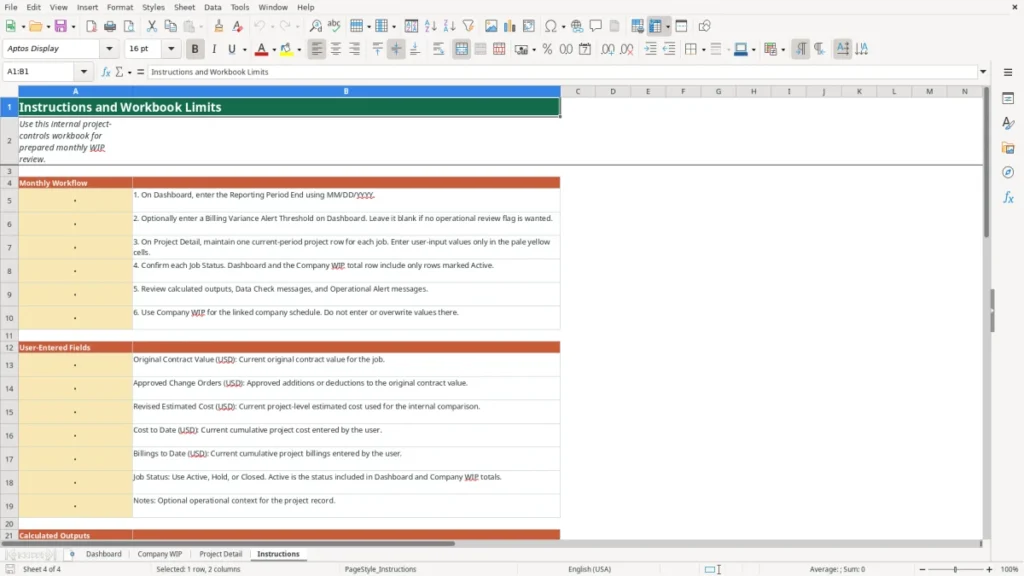
How to use this workbook
Set the reporting period
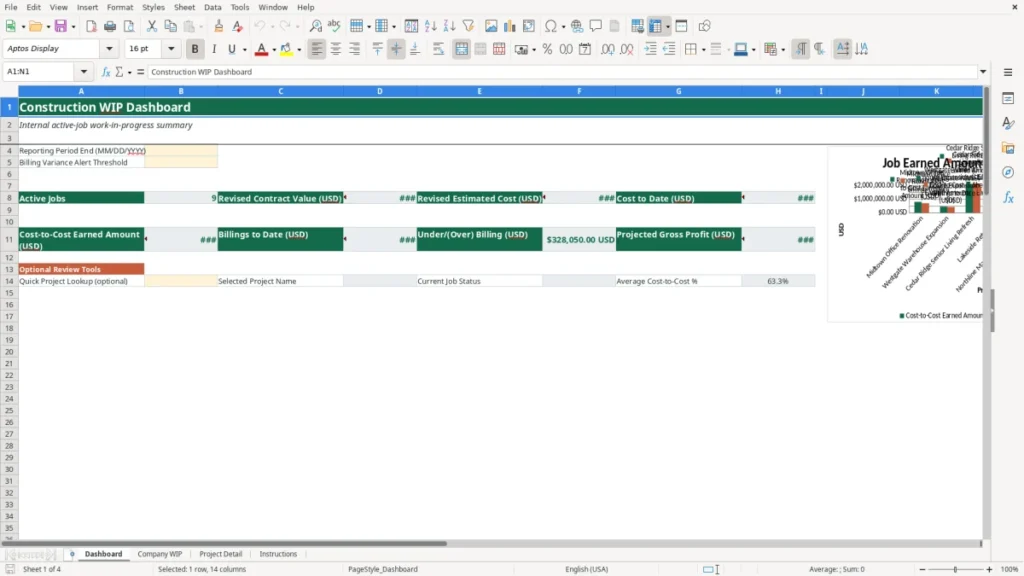
Open the Dashboard and enter the Reporting Period End using MM/DD/YYYY. The reporting period links to Company WIP. You may also enter a Billing Variance Alert Threshold as a decimal value. Leave the threshold blank if you do not want the workbook to display an operational review flag.
Maintain the project records
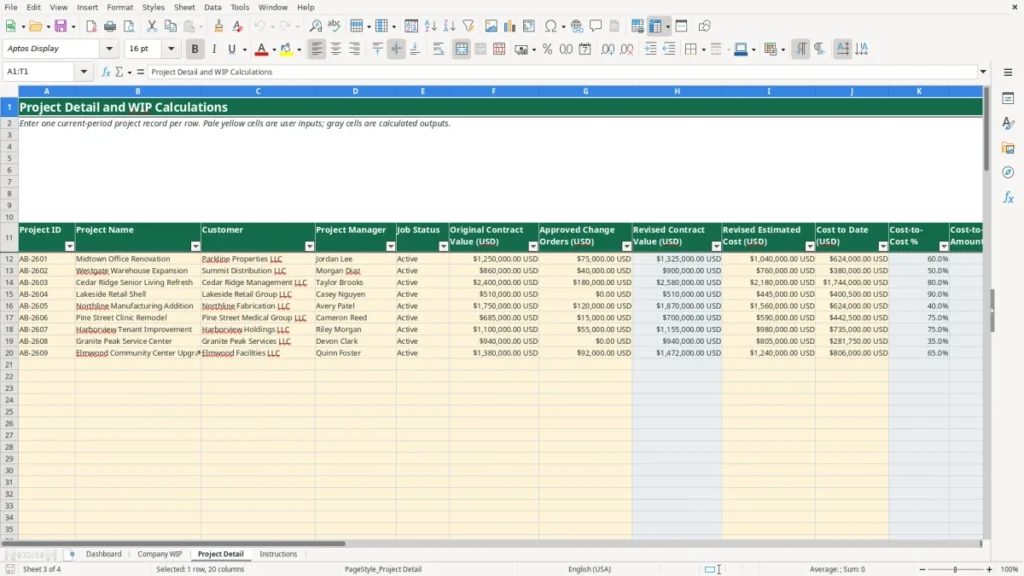
Enter one current-period project row for each job on Project Detail. User-entered fields include project ID, project name, customer, project manager, job status, original contract value (USD), approved change orders (USD), revised estimated cost (USD), cost to date (USD), billings to date (USD), and notes. Job Status choices are Active, Hold, and Closed.
Review calculated job outputs
Project Detail calculates revised contract value, cost-to-cost percentage, cost-to-cost earned amount, under/(over) billing, projected gross profit, projected GP percentage, and billing variance percentage. Review the Operational Alert and Data Check fields as internal prompts before using a row in a monthly review.
Use the linked roll-up sheets
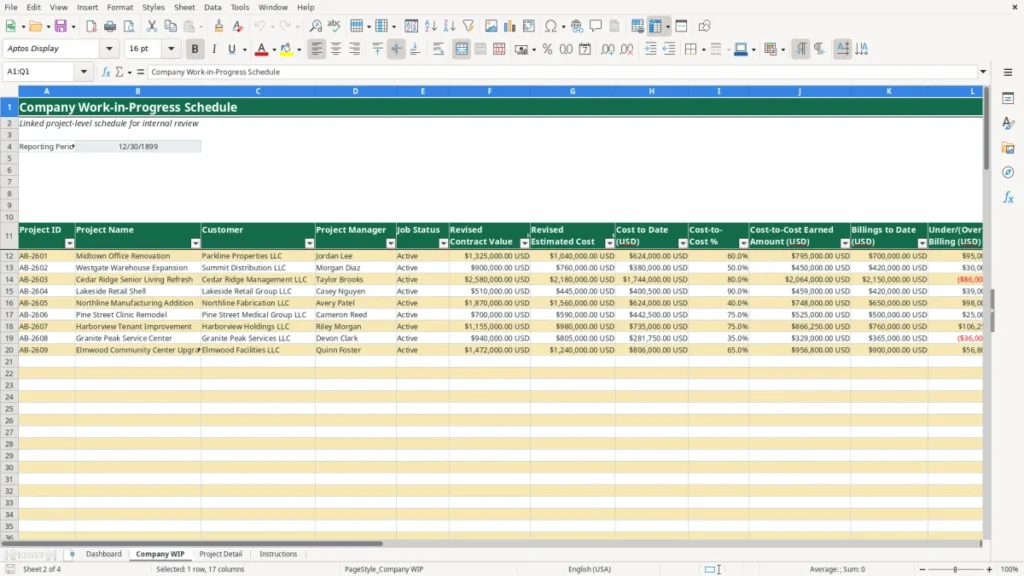
Company WIP links the Project Detail rows into a company schedule. Do not enter or overwrite values on Company WIP. Use the Dashboard for active-job totals, the reporting-period field, the optional alert threshold, and an optional project lookup.
Benefits
Review active-job WIP positions in a linked company schedule.
Compare revised contract value, estimated cost, cost to date, and billings in USD.
Use a user-defined threshold to prompt billing-variance review.
Keep user-entered project information separate from calculated roll-up values.
Features
Four worksheets: Dashboard, Company WIP, Project Detail, and Instructions.
Prepared linked schedules for up to 100 project records.
USD calculations for contract value, earned amount, billing position, and projected gross profit.
Optional operational alerts and formula-driven data checks.
Construction WIP calculations in Excel
The Project Detail sheet begins with the values maintained by the user. Original Contract Value (USD) is the current original contract value for the job. Approved Change Orders (USD) captures approved additions or deductions. Revised Estimated Cost (USD), Cost to Date (USD), and Billings to Date (USD) are current cumulative project figures entered for the reporting period.
The workbook calculates Revised Contract Value as original contract value plus approved change orders. Cost-to-Cost % equals cost to date divided by revised estimated cost. Cost-to-Cost Earned Amount (USD) equals revised contract value multiplied by cost-to-cost percentage. These calculations provide a consistent internal comparison for each entered project record.
Underbilling and overbilling summary
Under/(Over) Billing (USD) equals cost-to-cost earned amount less billings to date. A positive result is displayed as an underbilled position in this workbook, while a negative result is displayed as an overbilled position. Billing Variance % equals under/(over) billing divided by revised contract value.
Projected Gross Profit (USD) equals revised contract value less revised estimated cost. Projected GP % divides projected gross profit by revised contract value. These values are calculated from user-entered project amounts and should be reviewed alongside current project information, notes, and source records maintained outside the workbook.
Active-job company WIP review
Company WIP provides a linked schedule with project ID, project name, customer, project manager, job status, contract and cost amounts, calculated WIP measures, operational alerts, and data checks. It pulls its project-level values from Project Detail rather than serving as a separate data-entry sheet.
The Dashboard and the Company WIP total row include rows marked Active. The Dashboard summarizes the active-job count plus revised contract value (USD), revised estimated cost (USD), cost to date (USD), cost-to-cost earned amount (USD), billings to date (USD), under/(over) billing (USD), and projected gross profit (USD).
Operational alerts and workbook limits
When a Billing Variance Alert Threshold is entered on the Dashboard, the Operational Alert field displays Review when the billing variance percentage meets or exceeds that threshold in either direction. The threshold is optional and is controlled by the user; it is not a prescribed limit or conclusion about a project.
The Data Check field identifies incomplete core amount inputs and identifies when Cost to Date (USD) exceeds Revised Estimated Cost (USD). This workbook does not own transaction-level job costing, commitments, detailed budgets, pay-application forms, tax reporting, revenue-recognition policy, or audited financial statements. It summarizes prepared project-month information for internal review.
Frequently asked questions
What information do I enter in the construction WIP workbook?
Enter project identification and management fields, Job Status, Original Contract Value (USD), Approved Change Orders (USD), Revised Estimated Cost (USD), Cost to Date (USD), Billings to Date (USD), and optional notes on Project Detail. Use one current-period project record per job and enter the reporting period end on the Dashboard in MM/DD/YYYY format.
What does the workbook calculate?
The workbook calculates revised contract value, cost-to-cost percentage, cost-to-cost earned amount, under/(over) billing, projected gross profit, projected GP percentage, and billing variance percentage. It also links those results to Company WIP and active-job Dashboard totals.
Which projects appear in active-job totals?
Only rows with Job Status set to Active are included in the Dashboard active-job totals and the Company WIP total row. Hold and Closed are available Job Status selections, but they are not included in those active-job roll-ups.
How does the billing variance alert work?
Enter an optional decimal Billing Variance Alert Threshold on the Dashboard. When a project’s billing variance percentage meets or exceeds that threshold in either direction, the Operational Alert field displays Review. If the threshold is blank, no operational review alert is displayed.
Can this workbook replace job costing or financial reporting records?
No. This is a prepared internal WIP review workbook, not a transaction-level job-costing system or financial reporting record. It does not manage detailed cost transactions, commitments, pay applications, tax reporting, revenue-recognition policy, or audited financial statements.