Verified Excel workbook
Free 2026 Construction Equipment Ownership Workbook in Excel
Free 2026 construction equipment ownership Workbook in Excel for annual and hourly cost estimates, utilization scenarios, and planning review.
Download the free Construction Equipment Ownership Cost Workbook to organize a forward-looking estimate for one equipment asset in Excel. It brings acquisition economics and recurring ownership assumptions into an internal planning record, then presents annual and hourly results for review. The workbook is a planning aid, not a record of incurred project costs.
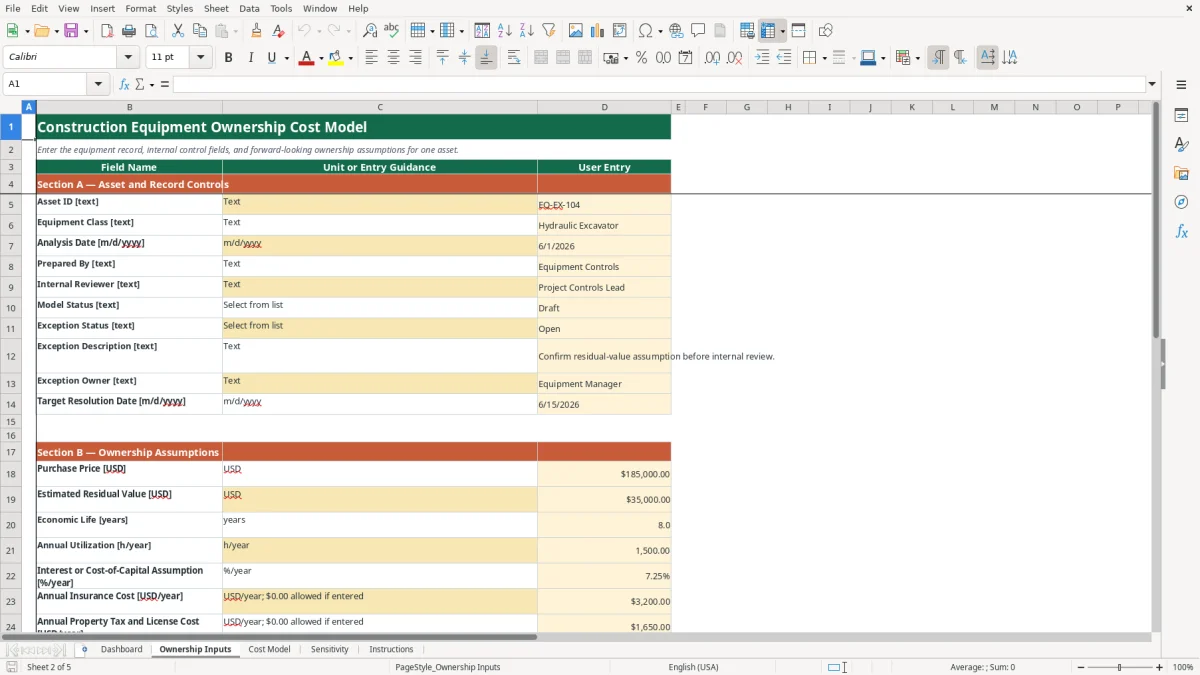
Enter the asset ID, equipment class, analysis date, purchase price in USD, estimated residual value in USD, economic life in years, annual utilization in h/year, annual rate assumption, insurance, property tax and license, storage, and an optional target recovery rate in USD/h. Use the record-control fields to identify preparation, review, and unresolved assumptions for the current asset.
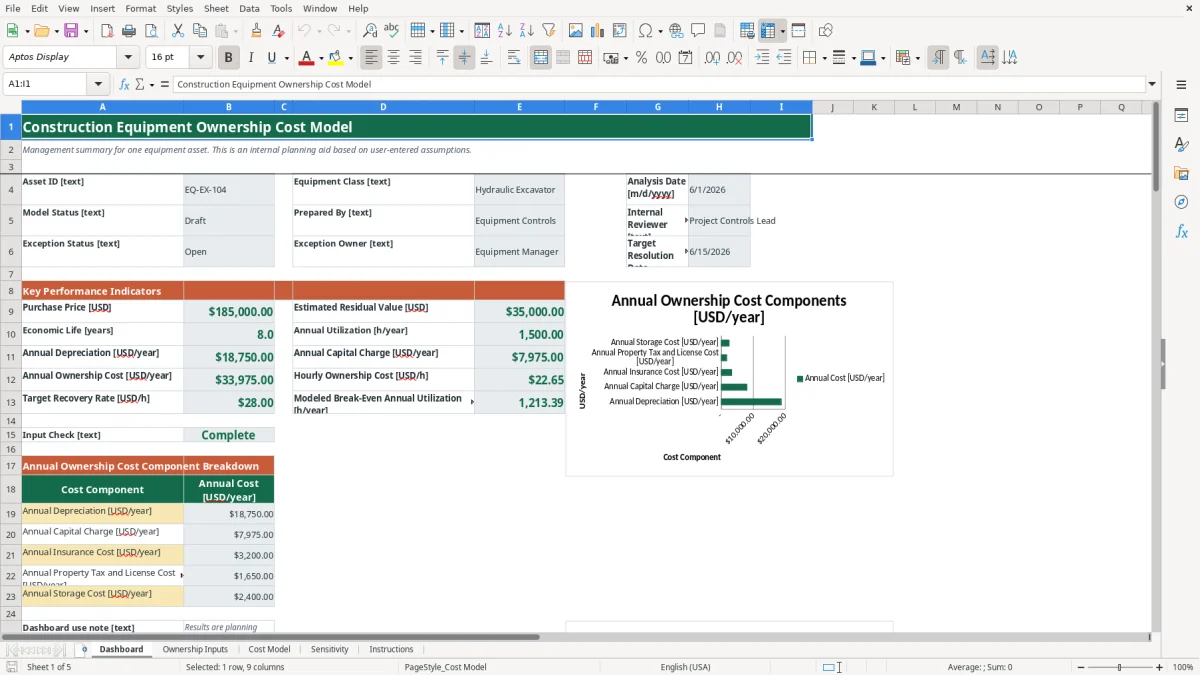
Final workbook preview
Four views generated from the verified XLSX.
How to use this workbook
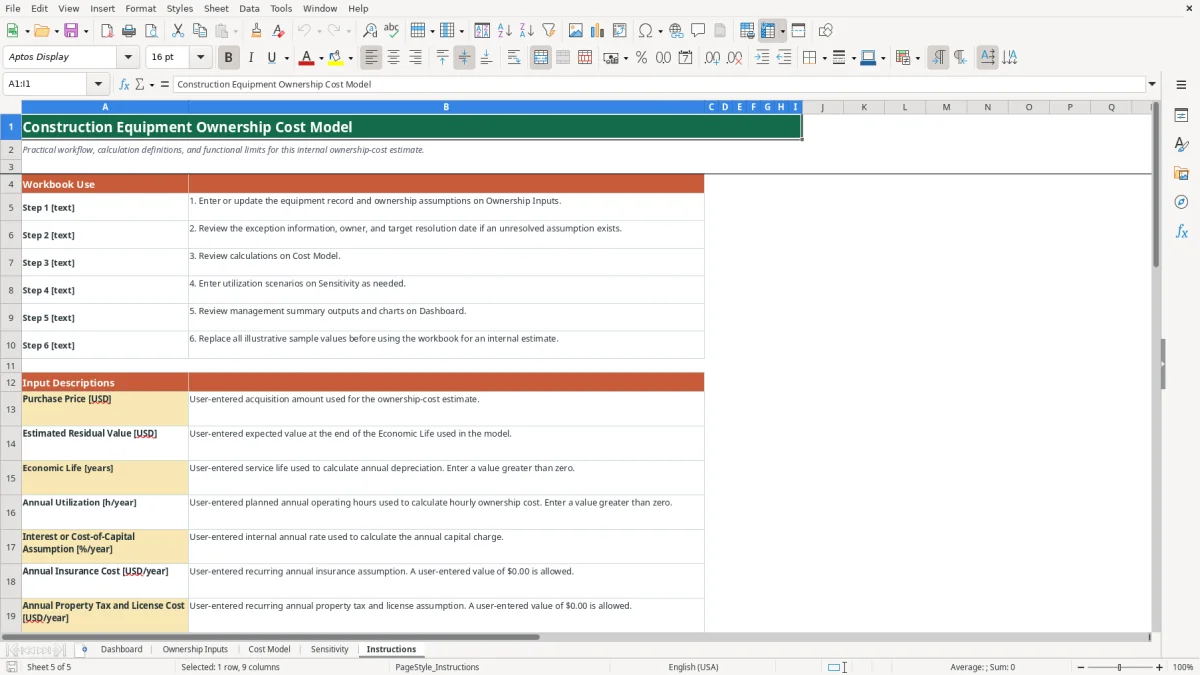
Start with the equipment record
Open Ownership Inputs and replace all illustrative sample values. Enter the asset ID, equipment class, analysis date in m/d/yyyy format, preparer, reviewer, model status, and exception details. Model Status and Exception Status use available list selections. Use the exception description, owner, and target resolution date to document an unresolved assumption rather than leaving its responsibility unclear.
Enter ownership assumptions
- Enter purchase price and estimated residual value in USD.
- Enter economic life in years and planned annual utilization in h/year.
- Enter the annual interest or cost-of-capital assumption, insurance cost in USD/year, property tax and license cost in USD/year, and storage cost in USD/year.
- Enter a target recovery rate in USD/h only if an internal comparison threshold is needed.
Review calculated outputs
Go to Cost Model to review annual depreciation, average invested capital, annual capital charge, annual ownership cost, hourly ownership cost, and modeled break-even annual utilization. The input check helps identify incomplete or basic arithmetic issues. Required values must be usable for the related calculation to return a result.
Test utilization and summarize
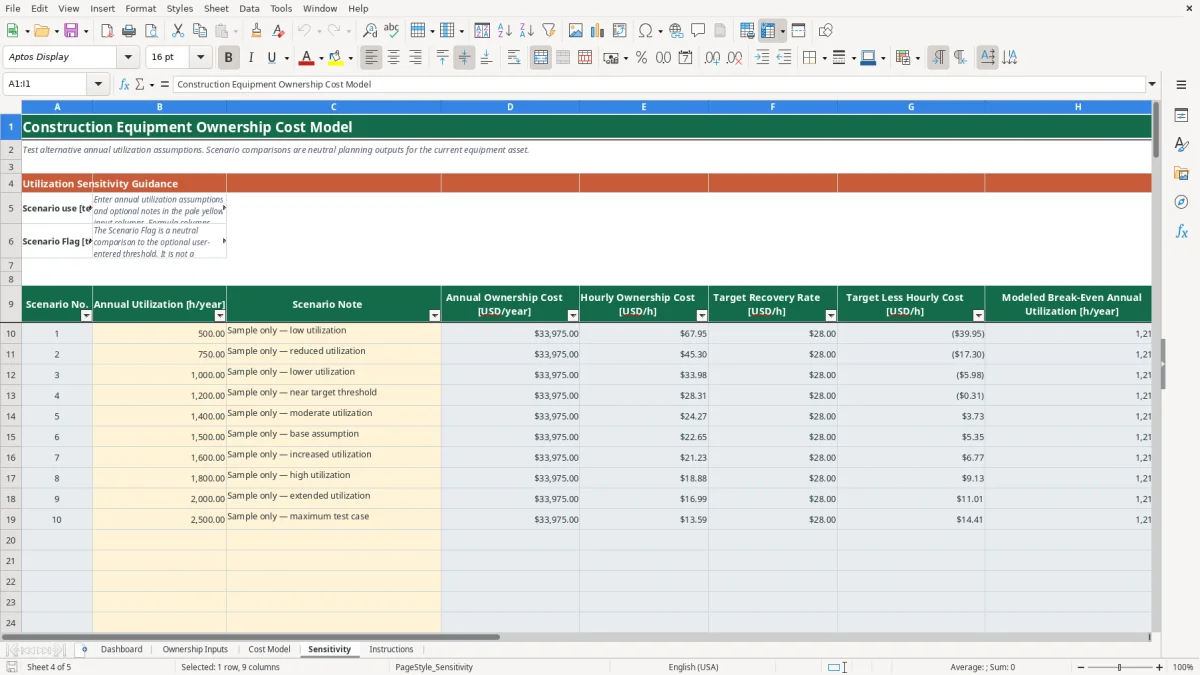
On Sensitivity, enter alternative annual utilization assumptions and optional scenario notes in the prepared scenario rows. Review the calculated hourly cost, target comparison, and neutral scenario flag. Then use Dashboard to review the asset record, key performance indicators, and annual ownership-cost component breakdown. Revisit open exceptions before relying on an internal estimate.
Benefits
Keeps ownership assumptions and record-control details together for one equipment asset.
Calculates annual ownership cost and hourly ownership cost from entered assumptions.
Shows the cost components that contribute to the annual estimate.
Supports utilization comparisons against an optional internal target recovery rate.
Features
Five worksheets: Dashboard, Ownership Inputs, Cost Model, Sensitivity, and Instructions.
Formula-driven depreciation, capital-charge, annual-cost, hourly-cost, and break-even calculations.
A prepared utilization sensitivity table with 110 scenario rows.
Dashboard KPI links and annual ownership-cost component breakdown charts.
Construction equipment ownership cost spreadsheet purpose
This construction equipment ownership cost spreadsheet is built for one asset at a time. It estimates the forward-looking economic carrying cost of owning an asset before any project allocation. The workflow begins with user-entered acquisition and recurring-cost assumptions, then carries those assumptions through a formula-driven cost record. It can help equipment managers and project-controls teams frame an internal discussion around a hydraulic excavator, loader, crane, or another equipment class without combining multiple asset records in one calculation.
The workbook does not allocate actual costs to projects, record actual utilization, calculate rental invoices, or schedule maintenance. Those activities require separate records and allocation rules outside this workbook.
Annual and hourly ownership cost calculations
The Cost Model explains the calculation basis for each result. Annual depreciation in USD/year equals purchase price less estimated residual value, divided by economic life. Average invested capital in USD equals purchase price plus estimated residual value, divided by two. Annual capital charge in USD/year equals average invested capital multiplied by the user-entered interest or cost-of-capital assumption.
The annual ownership cost combines depreciation, capital charge, annual insurance, annual property tax and license, and annual storage. The hourly ownership cost divides that annual result by planned annual utilization in h/year. These are calculated planning outputs based only on the current user entries and assumptions.
Utilization sensitivity for ownership-rate review
The Sensitivity worksheet lets users test alternative annual utilization assumptions in h/year for the same asset. Each populated scenario returns the annual ownership cost in USD/year, hourly ownership cost in USD/h, optional target recovery rate in USD/h, difference between target and hourly cost, and modeled break-even annual utilization in h/year. Scenario notes can identify why a utilization case is being reviewed.
The target recovery rate is optional and user defined. Its related scenario flag is a neutral comparison only; it is not a determination of profitability, billing, recovery, utilization adequacy, or a business outcome. The Dashboard provides a management summary and component breakdown for the current estimate.
Frequently asked questions
What information do I enter in this workbook?
Enter the equipment record and control fields, including asset ID, equipment class, analysis date, preparer, reviewer, status, and any exception information. Ownership assumptions include purchase price in USD, estimated residual value in USD, economic life in years, annual utilization in h/year, annual rate assumption, insurance, property tax and license, storage, and an optional target recovery rate in USD/h.
What does the workbook calculate?
The workbook calculates annual depreciation, average invested capital, annual capital charge, annual ownership cost, hourly ownership cost, and modeled break-even annual utilization. Dashboard also presents the current asset details, key performance indicators, and an annual ownership-cost component breakdown. Results depend on complete, usable user entries.
Does this workbook allocate equipment costs to projects?
No. This workbook estimates the ownership economics of an asset before project allocation. It does not distribute incurred equipment cost pools using actual usage records, record job-level utilization, or create rental invoices. Use separate project-cost and equipment-allocation processes for those functions.
Is modeled break-even annual utilization a profit calculation?
No. Modeled break-even annual utilization equals annual ownership cost divided by the optional user-entered target recovery rate in USD/h. It is an internal planning calculation that compares entered assumptions. It does not represent actual revenue, billing, entitlement, approval, profitability, or a guaranteed outcome.
Can I evaluate more than one equipment asset?
The workbook scope is one asset at a time. To evaluate another asset, create a separate copy or replace the current equipment record and assumptions after preserving the prior internal estimate as needed. The sensitivity scenarios test utilization alternatives for the current asset; they do not create a multi-asset fleet analysis.
Workbook file
Ready to put this workbook to work?
Download the verified XLSX, keep an untouched copy, and adapt a working copy to your project.
Download verified XLSXEditorial team
About the authors

Paige Sutton Vale
Workbook Systems Editor
Paige turns construction planning, cost-control, field, and closeout workflows into clear Excel workbook guides. She focuses on inputs, calculations, outputs, and practical limits.

Maren Ellsworth Keel
Workbook QA Reviewer
Maren reviews formula behavior, field labels, project-controls terminology, and workbook instructions so each resource stays within its documented scope.
Continue exploring