

Verified Excel workbook
Free Construction Material List Workbook in Excel 2026
Keep a project material register tied to the way field teams record activity: by material item and location. Download this free Construction Material List and Reconciliation Workbook in Excel to enter planned quantities, receipts, issues, and adjustments in one working file. It is designed for a project-level view of planned, received, issued, and adjusted quantities.
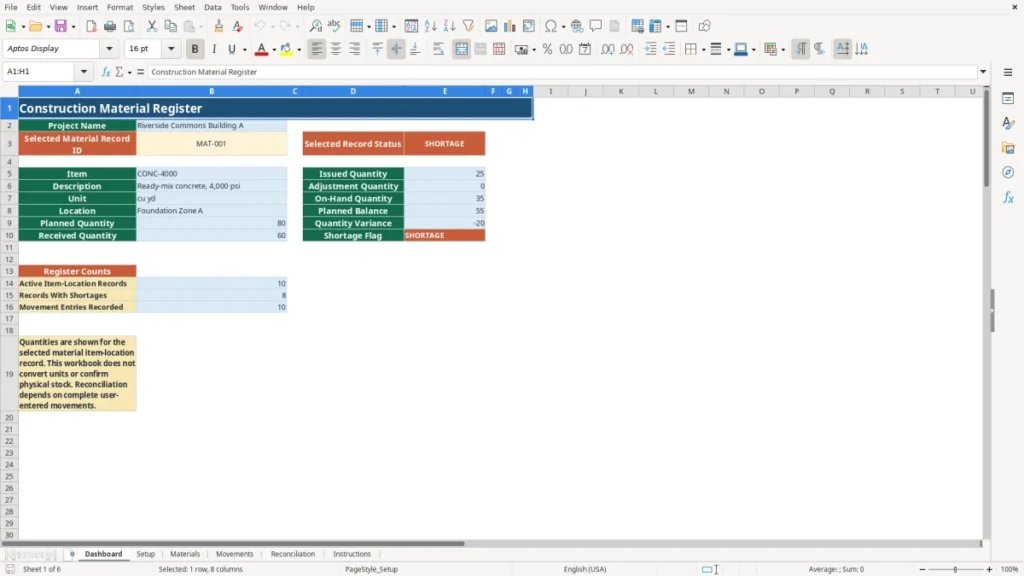
Use the register and movement ledger to compare user-entered activity with calculated on-hand quantity, planned balance, quantity variance, and a shortage flag. Review results by item-location record or selected location. The workbook does not estimate takeoff quantities, create purchase orders, certify inventory, or replace warehouse controls. Reconciliation depends on complete user-entered movements and does not confirm physical stock.
How to use this workbook
Set up project lists
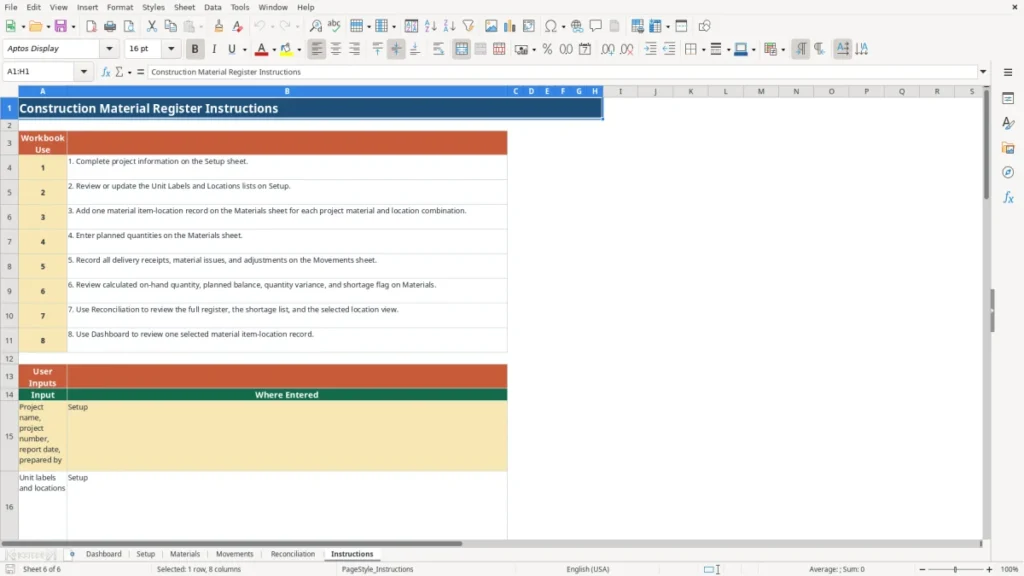
Begin on Setup. Enter the project name, project number, report date, and preparer. Use an m/d/Y date, such as 9/4/2026. Review the unit-label, location, and movement-type lists before entries begin. The included unit labels include EA, ft, sq ft, cu yd, lb, gal, ton, and bag. You may revise these project lists, but the workbook does not convert between units.
Build the material register
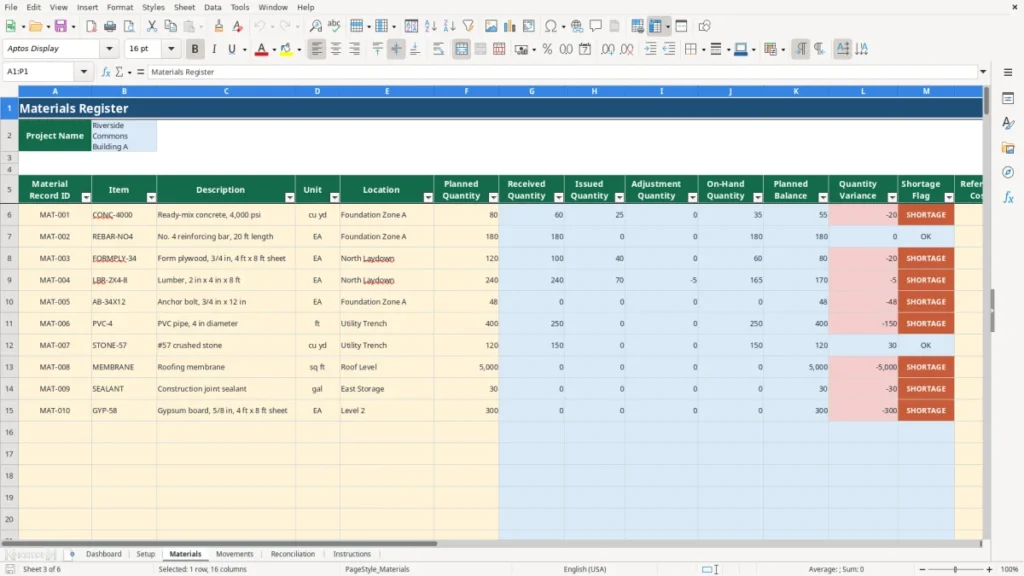
On Materials, add one record per item-location combination. Enter the material record ID, item, description, unit, location, and planned quantity. Notes are available for context. Reference Unit Cost is an optional user input in USD; when both planned quantity and reference unit cost are entered, the workbook calculates Planned Reference Value in USD.
Post every movement
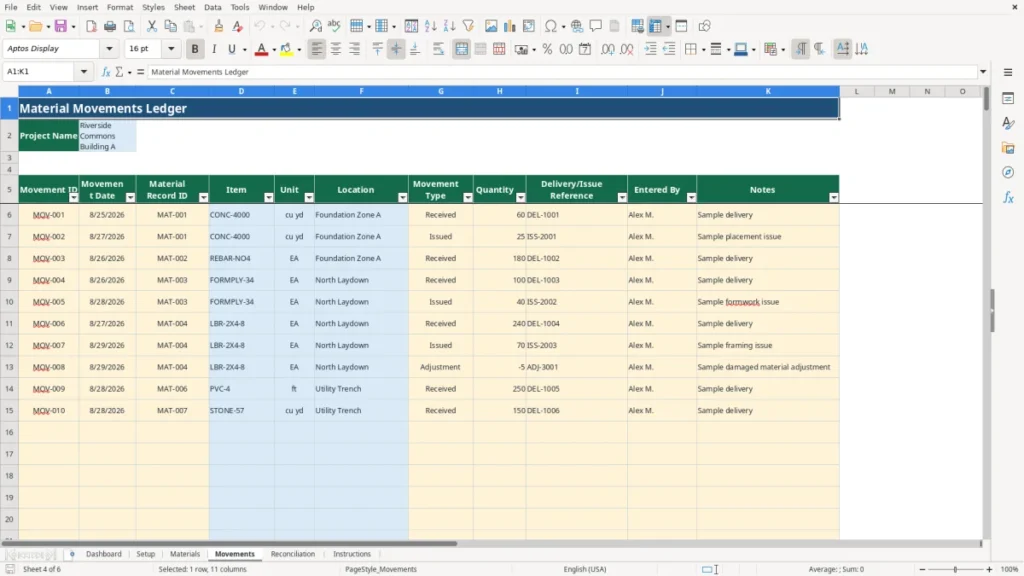
Use Movements for delivery receipts, field issues, and adjustments. Enter a movement ID, movement date, material record ID, movement type, quantity, delivery or issue reference, entered-by name, and notes. Use the same record ID that appears in Materials. Received and Issued quantities are positive entries; an adjustment can be a signed adjustment to reflect the activity you enter.
Review the reconciliation
Materials calculates the running quantity fields from the ledger. Reconciliation provides the full register, a shortage list, and a selected-location view. Dashboard lets you select a material record ID for a focused review. Check the calculated results against your source records and field process, then investigate missing, late, duplicate, or incorrectly coded movement entries before relying on a result.
Benefits
Connect planned material quantities to a defined project location.
Separate received, issued, and adjustment activity by record ID.
Review calculated shortages before discussing field follow-up.
Keep optional reference costs in USD beside quantity records.
Features
Six worksheets cover setup, materials, movements, reconciliation, dashboard review, and instructions.
Prepared Materials rows run from 6 through 205 for item-location records.
Prepared Movements rows run from 6 through 505 for ledger entries.
Location view and shortage list draw from calculated register results.
A construction material list for one project
This construction material list template Excel workflow is organized around a project material item-location record, not a companywide reusable-stock system. On Materials, each record carries an ID, item, description, unit, location, and planned quantity. That structure is useful when the same item must be reviewed separately at places such as a laydown area, foundation zone, or other project location.
The six workbook sheets are Dashboard, Setup, Materials, Movements, Reconciliation, and Instructions. Setup holds project information and editable project lists. Materials is the register, while Movements is the activity ledger that supplies receipt, issue, and adjustment totals.
How the quantity reconciliation works
For each material record ID, Received Quantity is the total of Received movements, Issued Quantity is the total of Issued movements, and Adjustment Quantity is the total of signed Adjustment movements. On-Hand Quantity equals received quantity minus issued quantity plus adjustment quantity. Planned Balance equals planned quantity minus issued quantity. Quantity Variance equals on-hand quantity minus planned balance.
These are calculated fields, not counts entered after a stock walk. The Shortage Flag displays SHORTAGE when Quantity Variance is below zero; otherwise it displays OK. Reconciliation repeats the register values, identifies shortage records, and supports a selected location view for review.
Practical boundaries for field use
Use the workbook as a controlled record of the entries your team makes, not as proof of materials physically present. A delivery, issue, return, loss, correction, or other adjustment that is not entered will not be reflected in the calculation. Treat the shortage list as a review cue, not a physical count.
The workbook has prepared operational rows for 200 Materials records and 500 Movements entries. It does not produce takeoff quantities, purchase orders, inventory certification, inter-location transfer controls, or reorder points. Optional USD cost fields are reference fields only and do not turn the workbook into a purchasing or warehouse-control system.
Frequently asked questions
How does the workbook calculate on-hand quantity?
The Materials sheet totals Received, Issued, and Adjustment entries from Movements for each material record ID. On-Hand Quantity equals received minus issued plus adjustment. The calculation relies on complete user-entered movements; it does not independently measure or verify material in the field.
Can I use different material units?
Yes. Setup includes editable unit labels, and Materials assigns one unit to each material record. Use the unit appropriate to that record, such as EA, ft, sq ft, cu yd, lb, gal, ton, or bag. The workbook does not convert quantities from one unit to another.
Do the calculated quantities prove physical stock?
No. The results summarize movement activity entered by users. They can support a reconciliation discussion, but they do not confirm delivery condition, placement, waste, loss, returns, or a physical count unless those events are accurately reflected in the movement ledger.
Does this workbook manage material purchasing or costs?
No. It does not create purchase orders or estimate takeoff quantities. You may enter an optional reference unit cost in USD, and the workbook calculates planned reference value from planned quantity and that cost. Those USD fields are reference only and do not manage commitments, invoices, or payments.