

Verified Excel workbook
Free 2026 Construction Schedule Workbook in Excel
Download this free 2026 construction schedule workbook in Excel to organize one project’s task sequence, planned dates, current finish dates, progress, and simple predecessor references. It is a one-project planning workbook built for practical master-schedule maintenance, with dates displayed in m/d/yyyy format and timing measured in calendar days.
The workbook includes Dashboard, Setup, Master Schedule, Milestones, and Instructions worksheets. It opens with populated sample project, task, and milestone entries that should be replaced with your project information. Use it to maintain a clear working schedule and review calculated timing indicators, not as a contract schedule or a critical-path tool.
How to use this workbook
Set up the project controls
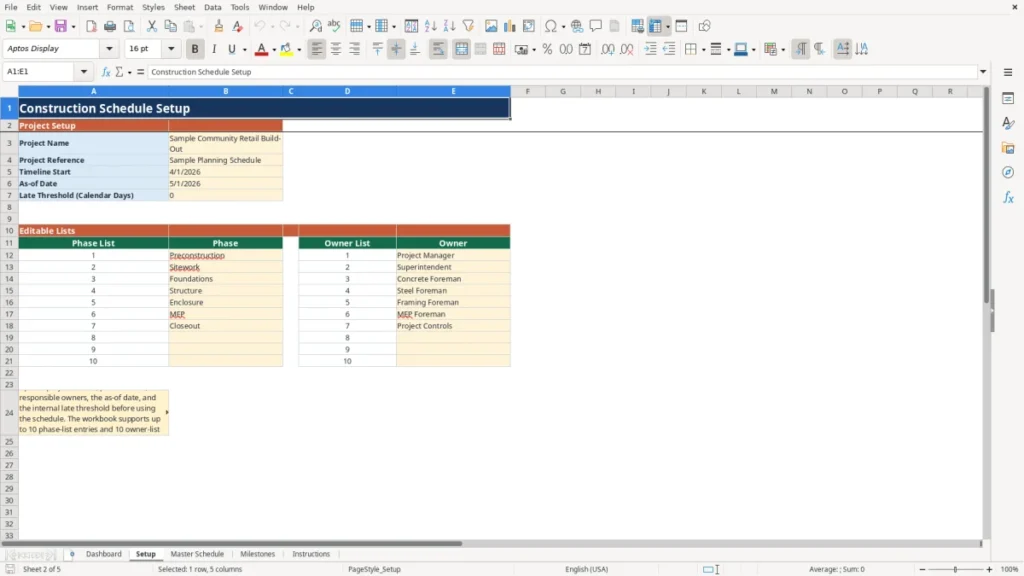
Start on Setup. Enter the project name, project reference, timeline start date, as-of date, and late threshold in calendar days. The phase and owner lists are also editable here. The as-of date supports update-needed checks, while the internal late threshold controls the workbook’s late-task reporting.
Build the task schedule
On Master Schedule, enter one row per task. Provide a unique task ID, phase, task description, owner, planned start, planned finish, dependency, percent complete, and current finish. Treat planned start and planned finish as the baseline dates. Enter percent complete as a percentage from 0% through 100%.
Update current timing
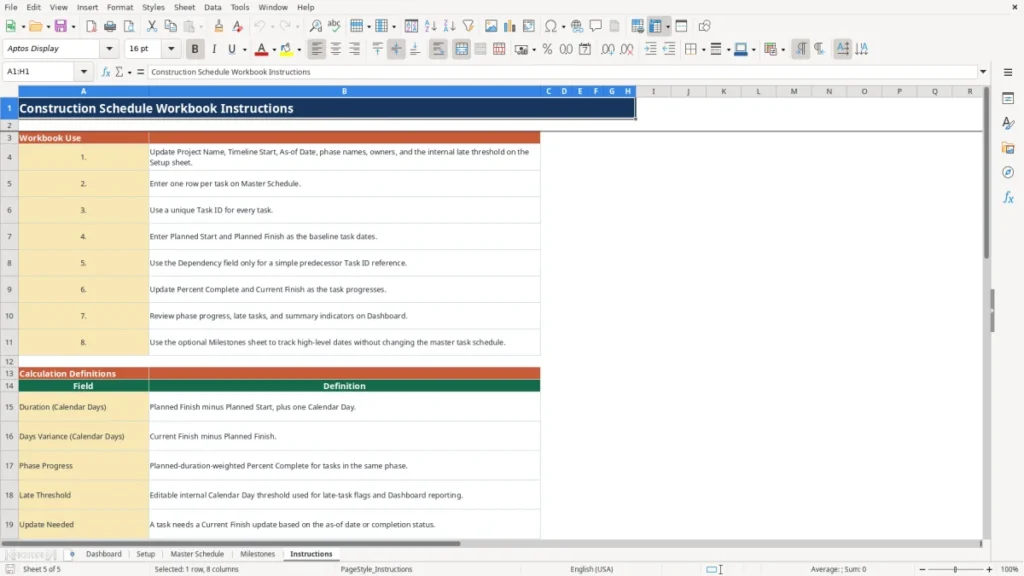
As work progresses, revise percent complete and current finish for each applicable task. The workbook calculates duration as planned finish minus planned start plus one calendar day. It calculates days variance as current finish minus planned finish, so a positive result is later than the planned finish.
Review the dashboard and milestones
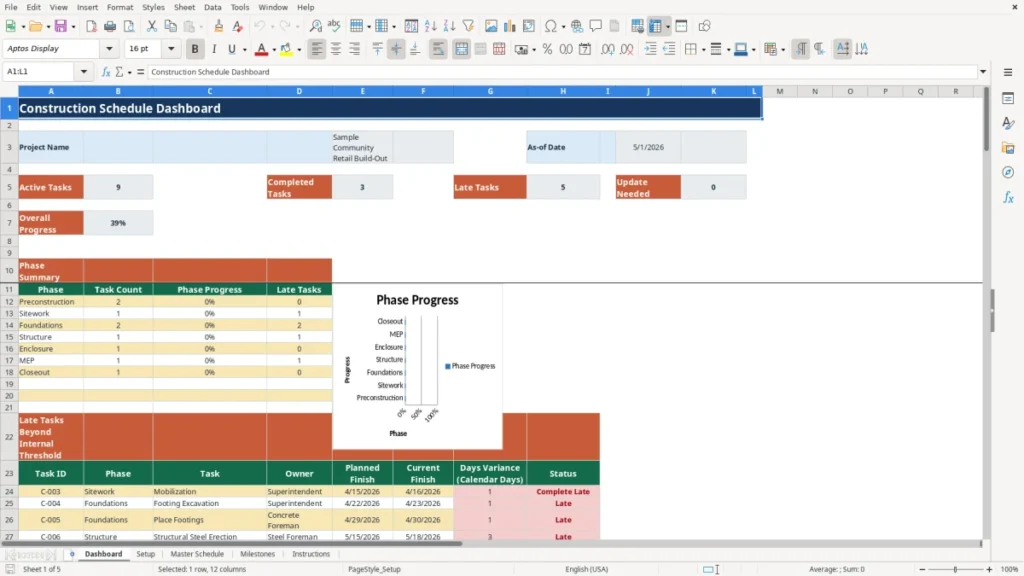
Use Dashboard to review task counts, overall progress, phase summaries, late tasks beyond the selected threshold, and tasks needing updates. Use Milestones for optional high-level dates, linked task IDs, owners, and notes. Milestone entries are separate from master task schedule calculations.
Benefits
Keep one project’s task sequence, baseline dates, and current dates in one workbook.
See calculated duration and finish variance in calendar days for each entered task.
Roll task progress into phase-level progress and an overall dashboard measure.
Separate optional milestone tracking from the working master task schedule.
Features
Five worksheets: Dashboard, Setup, Master Schedule, Milestones, and Instructions.
Prepared operational rows for 100 task entries and 100 milestone entries.
Dashboard counts for active, completed, late, and update-needed tasks.
Weekly timeline dates plus a phase-progress chart on the Dashboard.
Construction schedule template Excel workflow
This construction schedule template Excel workbook supports a straightforward baseline-versus-current workflow for one construction project. The Master Schedule captures task ID, phase, task, owner, planned start, planned finish, dependency, percent complete, and current finish. The workbook calculates task duration, days variance in calendar days, status, and a late-list rank when the required entries are available.
Dependencies are a simple reference field for predecessor task IDs. They help a team document sequence, but changing a dependency does not recalculate dates. Maintain planned and current dates directly when field conditions, procurement, trade coordination, or owner decisions change the working plan.
Dashboard reporting for practical schedule reviews
The Dashboard summarizes the schedule from the Master Schedule task rows. It reports active tasks, completed tasks, late tasks, update-needed tasks, and overall progress. Phase summaries show task count, phase progress, and late-task counts. Overall and phase progress are calculated using planned-duration-weighted percent complete, rather than a simple average of entered percentages.
The late-task list uses the Setup sheet’s editable internal threshold in calendar days. A task is counted as late when its calculated days variance exceeds that threshold. This is an internal reporting indicator for schedule review; it does not determine responsibility, entitlement, or contractual timing.
Milestones and weekly timeline context
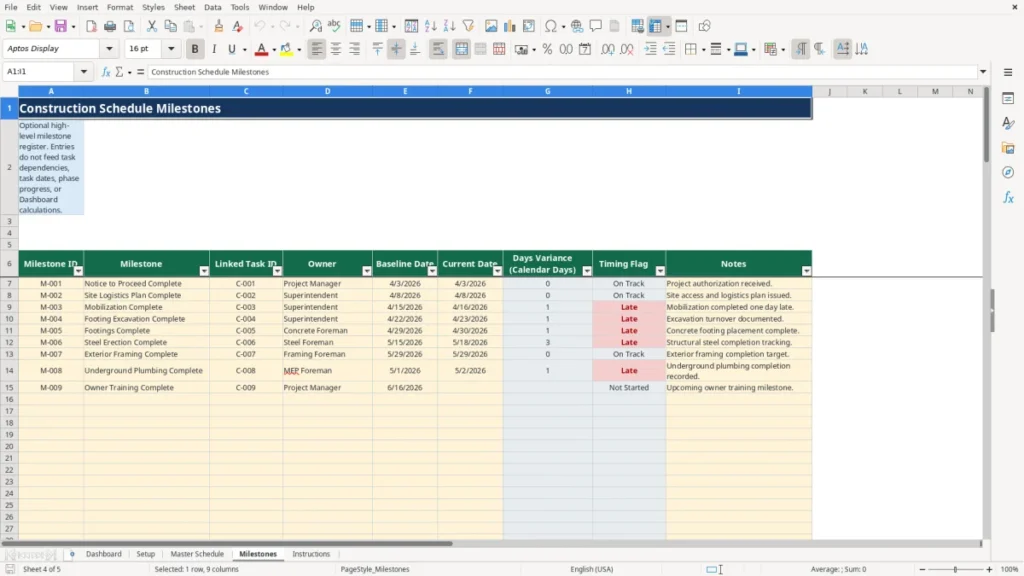
The optional Milestones worksheet records milestone ID, milestone name, linked task ID, owner, baseline date, current date, days variance, timing flag, and notes. It provides a high-level register alongside the detailed task schedule. Milestone timing is calculated from current date minus baseline date, expressed in calendar days.
Milestone entries do not feed task dependencies, task dates, phase progress, or Dashboard calculations. The Master Schedule also includes weekly timeline dates driven by the Setup timeline start date. Use these views for planning communication and routine updates while keeping the task register as the source for dashboard calculations.
Frequently asked questions
What information do I enter in the construction schedule workbook?
Enter project controls on Setup, then add task ID, phase, task, owner, planned start, planned finish, dependency, percent complete, and current finish on Master Schedule. Use unique task IDs so a dependency or linked milestone can reference the intended task. Planned and current dates are entered as m/d/yyyy dates.
How are duration and schedule variance calculated?
Duration equals planned finish minus planned start plus one calendar day. Days variance equals current finish minus planned finish. A positive variance means the entered current finish is later than the planned finish. These calculated outputs depend on valid planned and current finish dates.
Do dependencies automatically move successor dates?
No. The dependency column is informational only and accepts a predecessor task ID reference. It does not create automatic date changes, logic calculations, or successor updates. Users remain responsible for reviewing task sequence and revising dates as needed.
Can I use the milestone sheet for executive dates?
Yes. The Milestones worksheet is an optional high-level register with baseline and current dates, an owner, linked task ID, timing flag, and notes. Its entries do not change master task dates, dependencies, phase progress, or Dashboard results.
Is this workbook a CPM schedule?
No. This is not a CPM engine. It does not perform critical-path calculations, resource leveling, delay analysis, or contractual schedule updates. It is intended for practical planning, simple status maintenance, and internal schedule visibility for one project.