Verified Excel workbook
Construction Inventory Management Workbook in Excel Free 2026
Track construction yard stock by location with receipts, issues, returns, transfers, calculated balances, and reorder review in Excel.
Keep central-yard and satellite storage stock in a location-level ledger rather than mixing it with one-project material usage. Download this free Construction Inventory Management Workbook to record reusable or consumable construction stock as it is received, issued, returned, and transferred between user-defined locations.
You enter item IDs, descriptions, units, storage locations, opening quantities, reorder points, custodians, and custody notes. You also enter dated movement records and their quantities. The workbook then calculates location balances, on-hand and available quantities, movement totals, and reorder flags from accepted ledger entries. It is built for operational stock control, not a physical-count certification or inventory valuation.
Final workbook preview
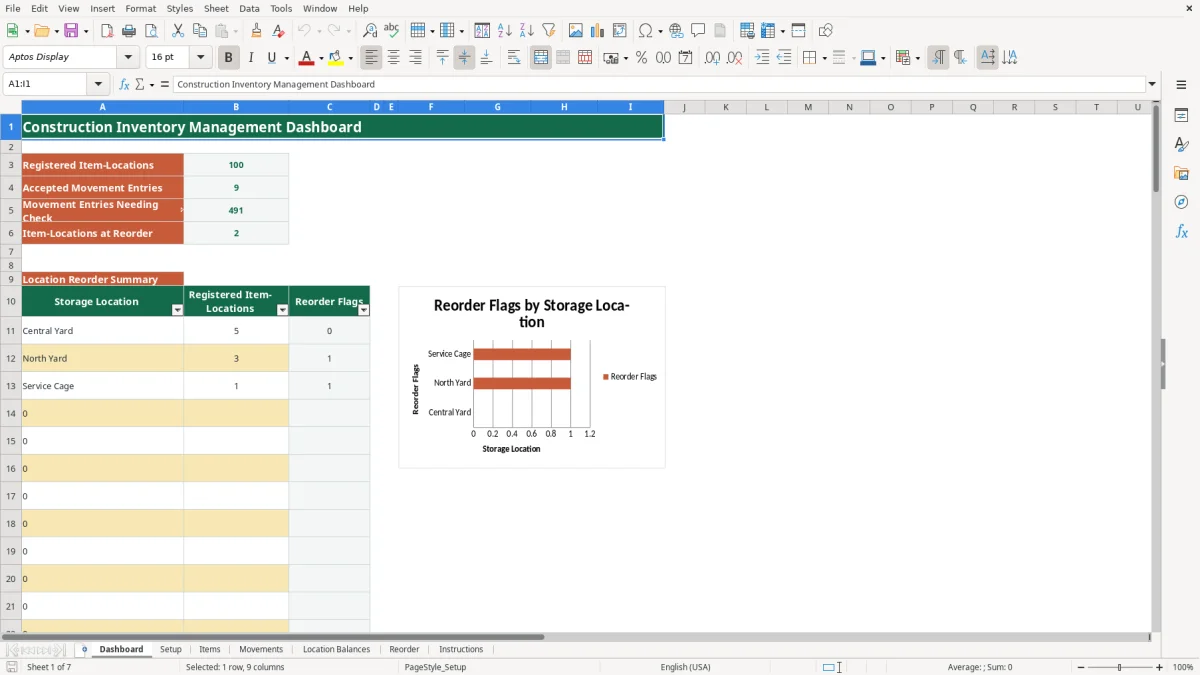
Four views generated from the verified XLSX.
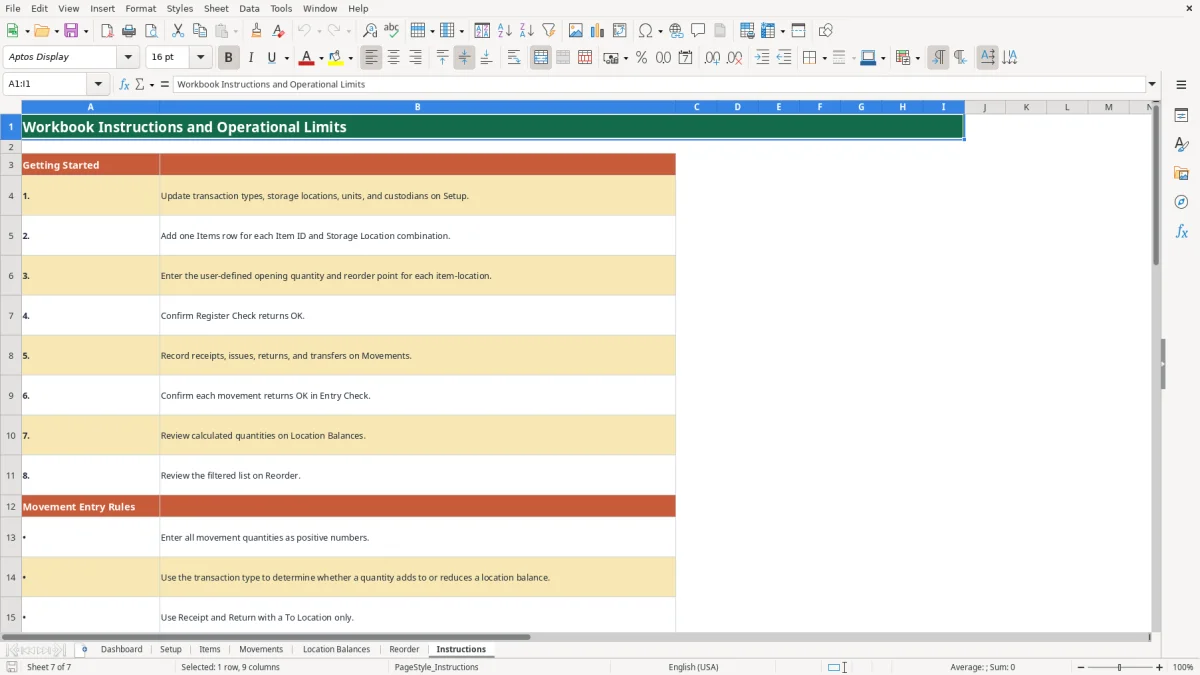
How to use this workbook
Set up operational lists
Start on Setup. Review the transaction types, storage locations, units, and custodians used by your team before entering stock records. The included list contains entries such as EA, FT, GAL, LB, BOX, and BAG; use the units that fit your internal stock records. Quantities remain in the unit entered and are not converted.
Register each item-location
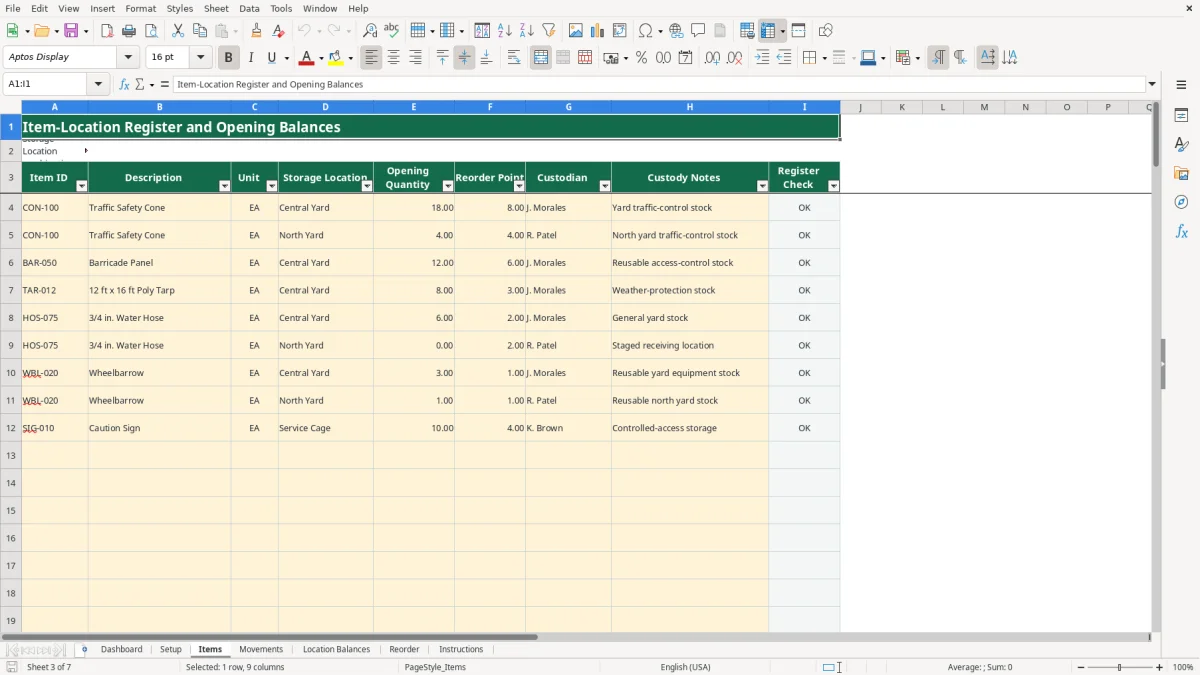
On Items, enter one row for each unique Item ID and Storage Location combination. Add the description, unit, opening quantity, reorder point, custodian, and custody notes. Opening quantity and reorder point are user-entered control inputs. Confirm that Register Check displays OK before relying on the record downstream.
Record stock movements
Use Movements for dated receipts, issues, returns, and transfers. Enter movement quantities as positive numbers. A receipt or return uses a To Location; an issue uses a From Location; and a transfer requires both locations to be different. Include a custodian, notes, and reference when useful to your process. Only rows with an Entry Check of OK feed the calculated balances.
Review calculated stock status
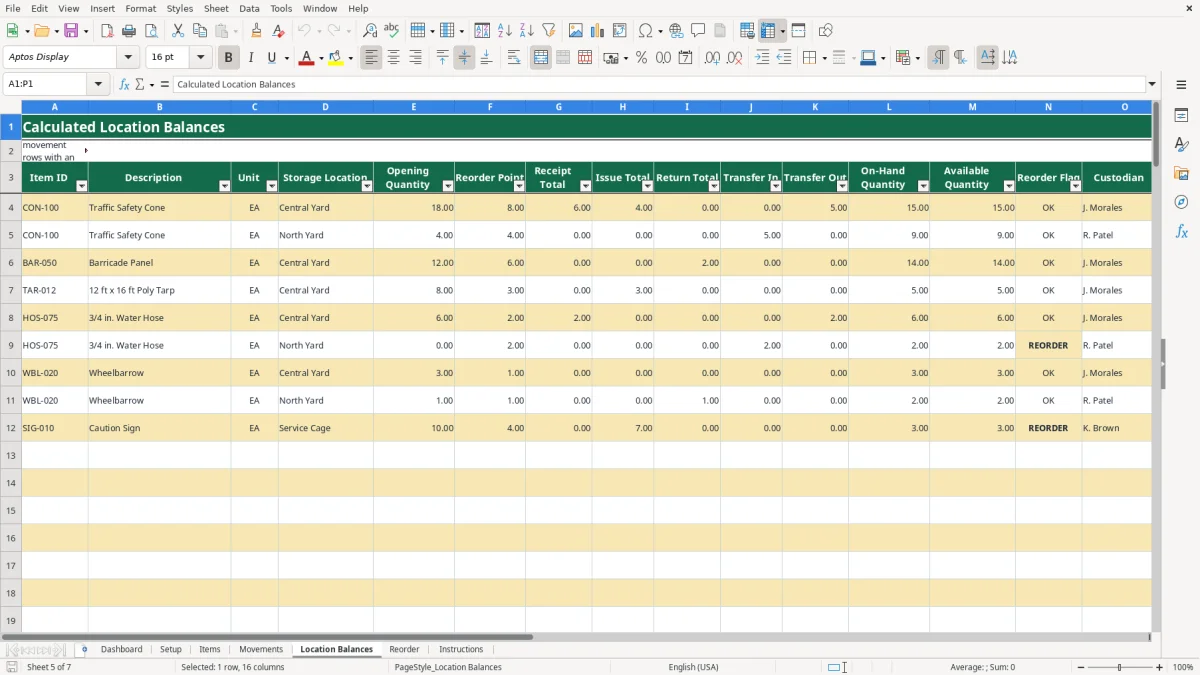
Review Location Balances for receipt, issue, return, and transfer totals by item-location. Then use Reorder to review available quantity, the entered reorder point, the reorder flag, custodian, and notes. Dashboard provides counts of registered item-locations, accepted entries, entries needing check, and reorder flags, along with a location reorder summary.
Benefits
Tracks each stock item by its specific storage location and entered unit.
Separates receipts, issues, returns, and transfers in one movement ledger.
Shows calculated on-hand and available quantities from accepted movement records.
Prompts review when quantity reaches the user-entered reorder point.
Features
Seven worksheets: Dashboard, Setup, Items, Movements, Location Balances, Reorder, and Instructions.
Item register captures ID, description, unit, location, opening quantity, custodian, and notes.
Entry Check identifies rows needing correction before they affect calculated balances.
Dashboard summarizes registered item-locations, accepted entries, check entries, and reorder flags.
Construction inventory management by storage location
This workbook supports construction inventory management Excel workflows where the same item may exist at more than one yard, cage, or storage area. Each register record is tied to one Item ID and one storage location, so a transfer can reduce quantity at one location and add the same quantity at another. That structure is useful for reusable yard stock and consumable stock that must remain distinguishable by location.
The workbook does not total quantities across unlike units. For example, an EA record and an FT record remain separate operational records. This helps keep the calculation focused on the unit supplied for each item-location rather than creating unsupported conversions.
How calculated inventory balances work
Location Balances starts with the entered opening quantity and adds receipt totals, subtracts issue totals, adds return totals, adds transfer-in totals, and subtracts transfer-out totals. The resulting On-Hand Quantity is a ledger calculation based on entered records. Available Quantity equals On-Hand Quantity because reservations and allocations are outside the workbook scope.
A movement must pass its Entry Check before it contributes to these totals. This gives the operator a practical review point for incomplete or inconsistent records, but it does not independently confirm that stock is physically present at the recorded location.
Reorder review without purchasing automation
The Reorder worksheet presents each calculated item-location with available quantity, its user-entered reorder point, reorder flag, custodian, and custody notes. The flag displays REORDER when available quantity is less than or equal to the entered reorder point. Treat it as an operational prompt for review, not an automatic buying decision.
No purchase orders, purchasing commitments, vendor records, or cost fields are created by this workbook. The Setup worksheet notes US English, USD conventions, and m/d/yyyy dates, but there is no USD cost or inventory valuation calculation in the workbook.
Construction stock-control scope and limits
The workbook is intended for central or yard stock receipts, issues, returns, transfers, reorder points, and custody notes across locations. It can help maintain a movement history and a calculated stock register for those records. Sample rows illustrate entries such as traffic safety cones, barricade panels, tarps, and hose, but those samples should be replaced or supplemented with your own records.
It does not perform barcode scanning, purchasing, accounting valuation, certified inventory counts, project takeoff, or equipment maintenance. It is also not designed to manage planned, received, installed or consumed, and remaining material for a single project. User-entered records drive every calculated result.
Frequently asked questions
What information do I enter in the workbook?
Enter item ID, description, unit, storage location, opening quantity, reorder point, custodian, and custody notes on Items. On Movements, enter the transaction date in m/d/yyyy format, transaction type, item ID, unit, positive quantity, applicable from or to location, custodian, notes, and a reference.
What movement types does the workbook handle?
It handles Receipt, Issue, Return, and Transfer. Receipt and Return add quantity to a destination location. Issue reduces a source location. Transfer reduces the From Location and adds the same quantity to the To Location. A transfer cannot use the same location on both sides of the entry.
Are the calculated balances a physical inventory count?
No. The calculated balances are ledger results from the entered opening quantities and movement rows marked OK. They can support a stock review, but they are not a certified physical count, an accounting inventory valuation, or evidence that a physical count has been performed.
How many prepared rows are included?
Items contains prepared operational rows from row 4 through row 103 for item-location records. Movements contains prepared operational rows from row 4 through row 503 for ledger entries. Calculated Location Balances and Reorder correspond to the prepared item-location rows, so teams should review their expected record volume before adopting the file.
Can this workbook create purchase orders or track equipment maintenance?
No. The reorder flag is based only on the reorder point you enter and does not create purchase orders or purchasing commitments. The workbook also does not provide barcode scanning, accounting valuation, project takeoff, or equipment maintenance tracking. Its function is transaction-based yard stock control across storage locations.
Workbook file
Ready to put this workbook to work?
Download the verified XLSX, keep an untouched copy, and adapt a working copy to your project.
Download verified XLSXEditorial team
About the authors

Paige Sutton Vale
Workbook Systems Editor
Paige turns construction planning, cost-control, field, and closeout workflows into clear Excel workbook guides. She focuses on inputs, calculations, outputs, and practical limits.

Maren Ellsworth Keel
Workbook QA Reviewer
Maren reviews formula behavior, field labels, project-controls terminology, and workbook instructions so each resource stays within its documented scope.
Continue exploring